IVR Editor
IVR Editor is a visual IVR flow editor that supports drag-and-drop menu design, business hours control, TTS voice synthesis, and multi-level menus.
1. Enable
[proxy]
addons = ["ivr-editor"]
Database requirements: automatically creates rustpbx_ivr_projects and rustpbx_ivr_version_history tables. Supports SQLite / MySQL / PostgreSQL.
2. Project Management
2.1 Create a Project
Console → IVR Editor → New Project:
- Name, description
- Status: draft / published
2.2 Version Management
Each publish creates a version snapshot with rollback support:
- View version history
- One-click rollback to a previous version
3. Visual Editing
3.1 Node Types
| Node | Description | Parameters |
|---|---|---|
| Menu | Menu node | DTMF option mapping |
| Play | Play audio | Audio file or TTS text |
| Transfer | Transfer | Extension / queue / external number |
| Queue | Queue | Queue name, supports return_to_ivr |
| Voicemail | Voicemail | Mailbox extension number |
| Collect | Collect digits | Variable name, digit count, timeout |
| CollectExtension | Collect extension | Transfer to the entered extension |
| Webhook | Call HTTP API | URL, Headers |
| Hangup | Hang up | Optionally play prompt then hang up |
| Repeat | Replay current menu |
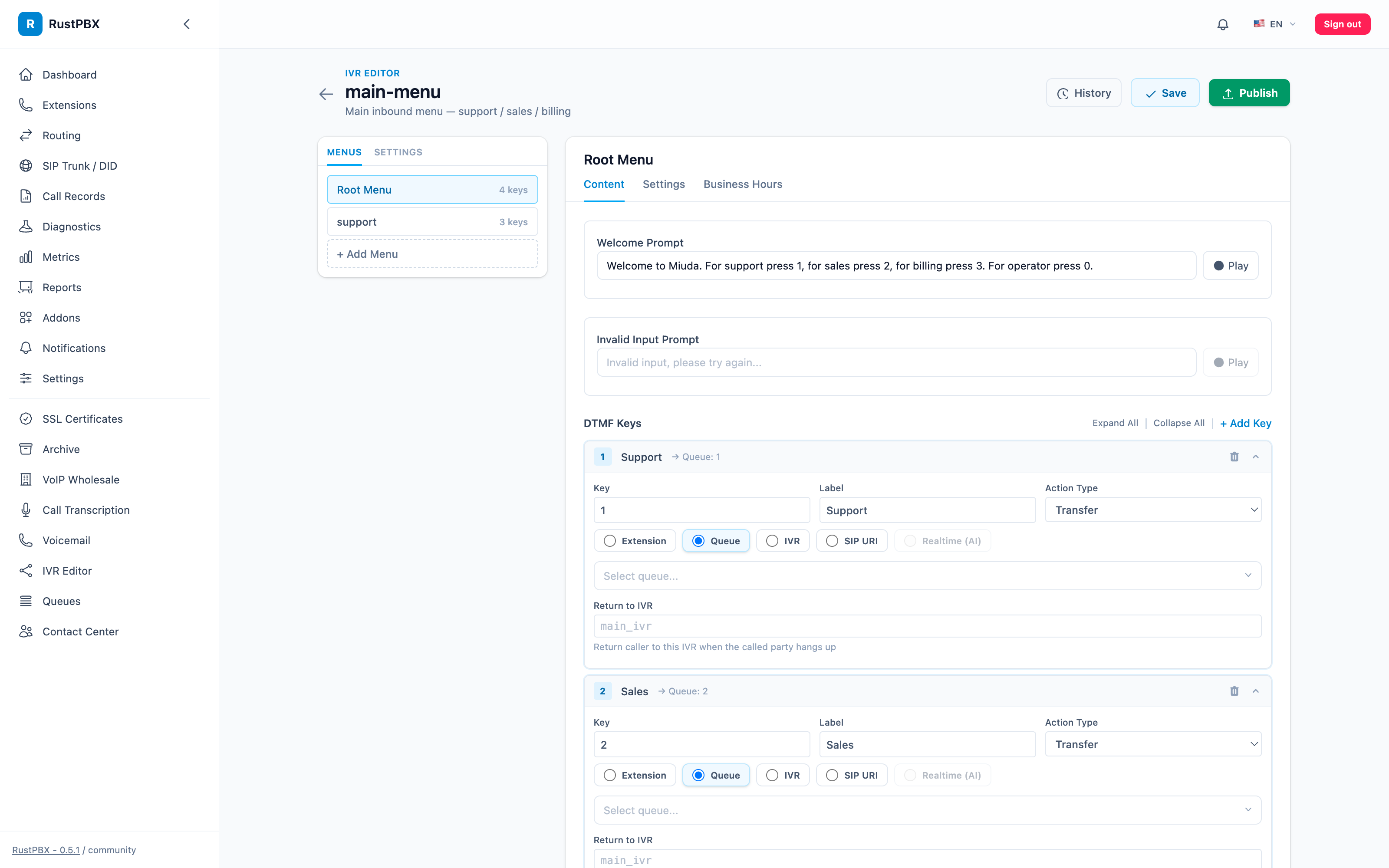
The editing surface: menus on the left (root + named sub-menus), and for the selected menu — the welcome prompt (audio file or TTS), the invalid-input prompt, timeout/retry settings, and one collapsible card per DTMF key with its label and action (Queue / Transfer / IVR / SIP URI / Realtime). History shows published versions with one-click rollback; Save writes a draft and Publish puts it live.
3.2 Editing Flow
- Drag nodes onto the canvas
- Connect nodes (DTMF key → target node)
- Configure parameters for each node
- Set business hours rules
- Preview and publish
3.3 Business Hours
Each project can configure:
| Setting | Description | Example |
|---|---|---|
| Timezone | Timezone for time evaluation | Asia/Shanghai |
| Workdays | Working days | Monday to Friday |
| Work hours | Daily working time slots | 09:00-12:00, 13:00-18:00 |
| Break time | Lunch break, etc. | 12:00-13:00 |
| Off-hours action | Handling for breaks / non-workdays | Transfer to voicemail / play prompt then hang up |
4. TTS Voice Synthesis
4.1 Built-in Edge TTS
Uses Microsoft Edge TTS (edge-cli tool) for voice synthesis:
Supports 11 voices:
| Voice ID | Language | Gender |
|---|---|---|
| zh-CN-XiaoxiaoNeural | Chinese | Female |
| zh-CN-YunxiNeural | Chinese | Male |
| en-US-JennyNeural | English | Female |
| en-US-GuyNeural | English | Male |
| ja-JP-NanamiNeural | Japanese | Female |
| ko-KR-SunHiNeural | Korean | Female |
| es-ES-ElviraNeural | Spanish | Female |
| fr-FR-DeniseNeural | French | Female |
| de-DE-KatjaNeural | German | Female |
4.2 TTS Cache
TTS results are cached to a local directory by SHA-256(voice+text) to avoid redundant synthesis.
4.3 Manual TTS
POST /console/ivr_editor/tts
Body: { "text": "欢迎致电", "voice": "zh-CN-XiaoxiaoNeural" }
4.4 Audio Upload
Supports uploading custom WAV/MP3 audio files as IVR prompts.
5. Publish Flow
- Click Publish after editing
- The system automatically:
- Builds IVR TOML configuration
- Generates all TTS audio
- Saves version snapshot
- Writes to the configuration directory
- RustPBX hot-reloads the new IVR configuration
6. Configuration
config/ivr_editor.toml:
sounds_dir = "config/sounds"
ivr_config_dir = "config/ivr"
tts_cache_dir = "config/tts_cache"

[default_voices]
zh = "zh-CN-XiaoxiaoNeural"
en = "en-US-JennyNeural"
7. API
| Operation | Endpoint |
|---|---|
| List projects | GET /console/ivr_editor |
| Create project | POST /console/ivr_editor |
| View project | GET /console/ivr_editor/{id} |
| Update project | PATCH /console/ivr_editor/{id} |
| Publish | POST /console/ivr_editor/{id}/publish |
| Version history | GET /console/ivr_editor/{id}/versions |
| Rollback | POST /console/ivr_editor/{id}/versions/{vid}/rollback |
| TTS synthesis | POST /console/ivr_editor/tts |
| Upload audio | POST /console/ivr_editor/upload-sound |