Agent Management
1. Agent State Machine
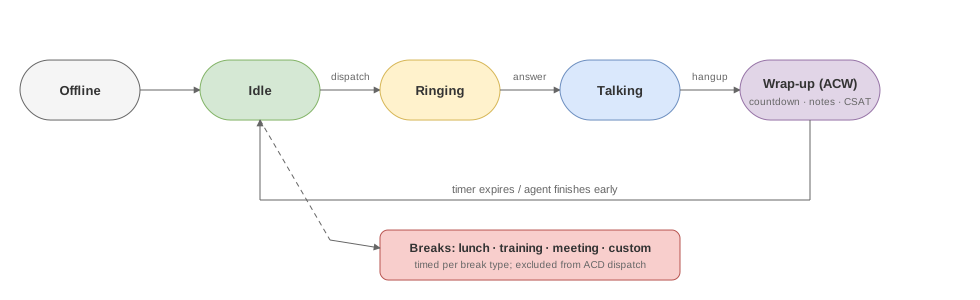
                    Register Online
   Offline ──────────────────► Idle
     ▲                          │
     │                          │ Incoming call ringing
     │                          ▼
     │                       Ringing
     │                          │
     │                   ┌──────┴──────┐
     │                   │ Answer       │ No answer
     │                   ▼              ▼
     │                  Busy          (back to Idle)
     │                   │
     │                   │ Hang up
     │                   ▼
     │                Wrapup (After-call work)
     │                   │
     │          Timeout / Manual end
     │                   │
     └───────────────────┘
                          │ Manual away
                          ▼
                       Away / Dnd / Custom
| State | Description | Can receive calls |
|---|---|---|
| Offline | Not registered / offline | No |
| Idle | Available, waiting for assignment | Yes |
| Ringing | Ringing | No |
| Busy | On a call | No |
| Wrapup | After-call work | No |
| Away | Away (e.g. lunch) | No |
| Dnd | Do not disturb | No |
| Custom | Custom status | No |
1.1 State Transition API
POST /cc/agents/{agent_id}/status
Body: { "status": "idle" }
Available transitions:
idle→ go availableaway→ awaydnd→ do not disturbcustom:lunch→ custom status (lunch)offline→ go offline
1.2 After-Call Work (Wrapup)
After a call ends, the agent automatically enters Wrapup state:
- Default timeout is 60 seconds (configured via
wrapup_timeout_secs) - Agent can manually end early (
POST /cc/agents/{agent_id}/wrapup/end) - Automatically returns to Idle after timeout
2. Creating an Agent
2.1 Console
Call Center → Agents → New:
| Field | Description | Example |
|---|---|---|
| Agent ID | Unique identifier | agent-001 |
| Display name | Display name | John |
| Extension | SIP extension number | 1001 |
| Skill group | Assigned skill group | sales |
| Max concurrent | Max simultaneous calls | 1 |
| Priority | ACD assignment priority (0-100) | 50 |
2.2 Batch Operations
Agents → Batch Update: modify skill groups, max concurrent, etc. in bulk.
2.3 Export / Reload
- Export: export agent configuration as a TOML file
- Reload: reload agent configuration from a TOML file
3. Agent Endpoints
Each agent can bind multiple endpoints (SIP softphone, hard phone, WebRTC):
Agent agent-001
  ├── SIP extension 1001 (registered to RustPBX)
  ├── cc-phone (Web softphone)
  └── Simultaneous ring supported
3.1 Endpoint Registration
Agent endpoints register to RustPBX via standard SIP REGISTER. The system automatically associates them with the corresponding agent.
3.2 CC Phone Authentication
CC Phone uses a separate authentication mechanism (/cc/phone/config), supporting:
- Console session-based authentication
- Standalone agent login (
phone_auth) - SSO handoff (0.5+): native clients can log in through an OTC (one-time code) exchange instead of embedding credentials
3.3 Outbound Lines & Per-Agent Policies (0.5+)
Agents no longer need a separate dial-out setup. The CC addon manages outbound calling centrally:
- Per-agent outbound policies restrict which routes, trunks, and caller-ids an agent may use — configured in the console and hot-reloaded.
- Allowed lines are delivered to the CC Phone as
desk.lines[]; the desk shows an outbound line picker with server-side prefix dialing rules applied per line. - Policy filtering happens at dispatch time, so an agent can only place calls through lines their policy allows, with the correct caller-id stamped automatically.
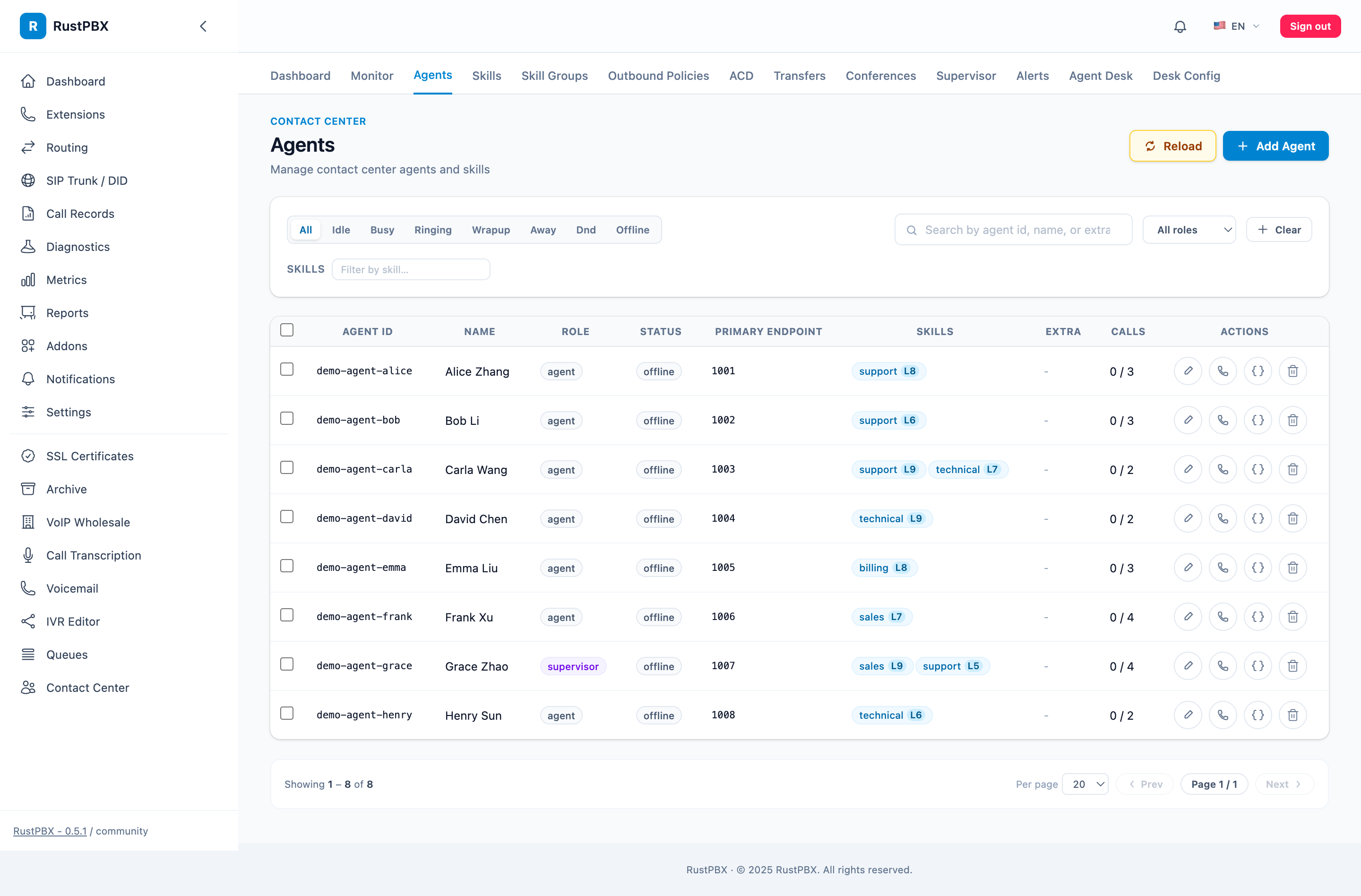
4. Agent Statistics
Each agent maintains the following metrics (in the cc_agent_stats table):
| Metric | Description |
|---|---|
| Total calls | Total calls handled |
| Total talk time | Cumulative talk time in seconds |
| Average talk time | Total time / Total calls |
| Login duration | Total online time today |
| Idle duration | Total idle time today |
| Wrapup duration | Total wrapup time today |
| Break duration | Total away/custom time today |
| Per-break usage (0.5+) | Time accumulated per break type (lunch/training/…) |
Queryable via API:
GET /cc/agents/{agent_id}/dashboard
GET /cc/reports/agents
5. Agent Dashboard
GET /cc/agents/{agent_id}/dashboard returns complete agent-view information:
- Current status
- Active call (if any)
- Today’s statistics
- Skill group information
6. Break Type Management
Customize break types in config.toml:
[proxy.cc.phone]

[[proxy.cc.phone.break_types]]
id = "lunch"
label_zh = "午休"
label_en = "Lunch"

[[proxy.cc.phone.break_types]]
id = "training"
label_zh = "培训"
label_en = "Training"

[[proxy.cc.phone.break_types]]
id = "meeting"
label_zh = "会议"
label_en = "Meeting"

[[proxy.cc.phone.break_types]]
id = "personal"
label_zh = "个人事务"
label_en = "Personal"