Supervisor
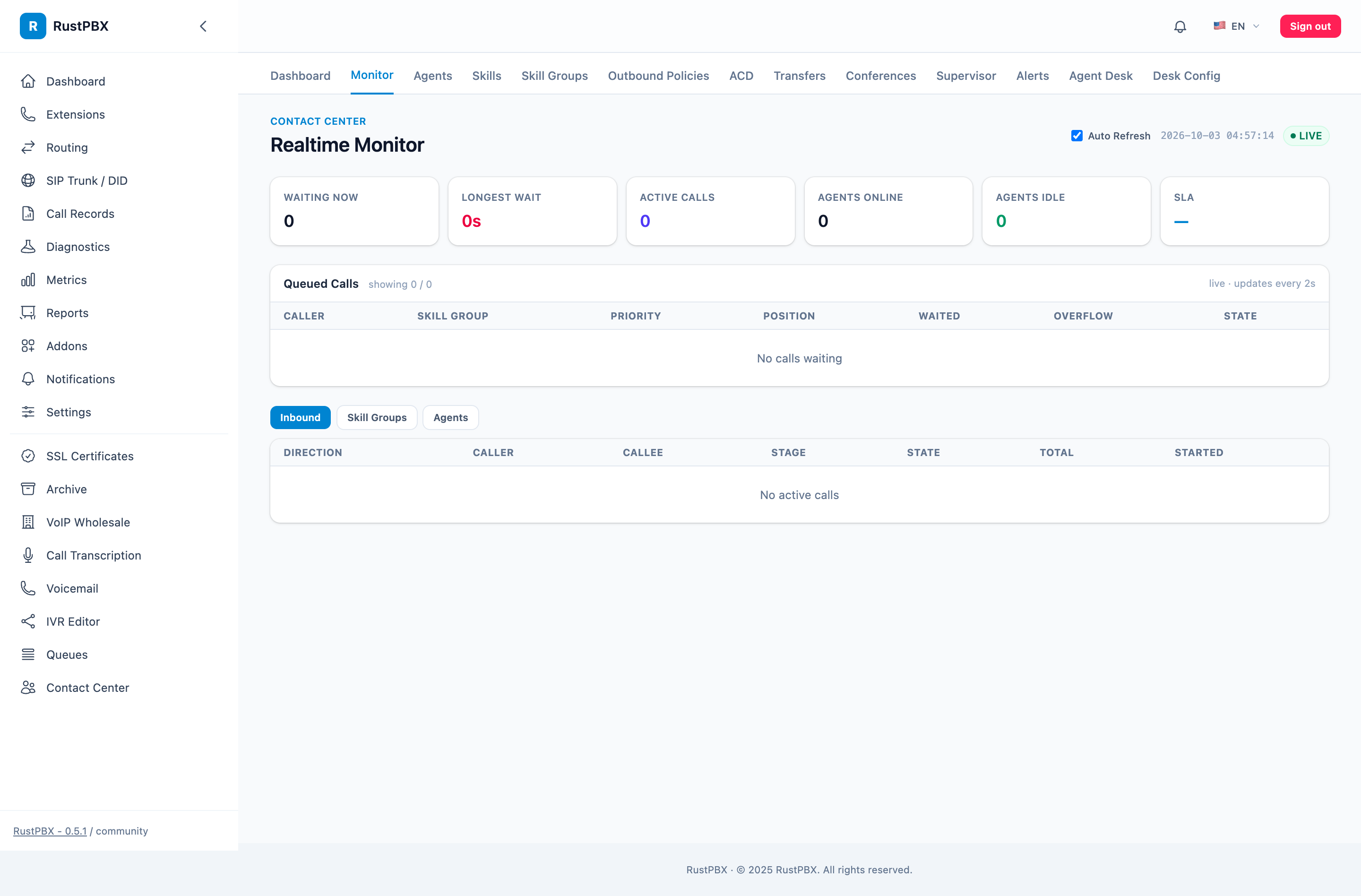
The Supervisor module provides real-time monitoring and intervention capabilities for the call center.
1. Real-time Monitoring
1.1 Dashboard
Call Center → Real-time Monitoring (/cc/realtime):
| Metric | Description |
|---|---|
| Queue count | Current number of callers in each queue (per-queue waiting depth, 0.5+) |
| Active calls | Ongoing calls |
| Idle agents | Number of agents currently in Idle state |
| Average wait | Average wait time in queue |
| SLA rate | Answer rate within X seconds |
1.2 Queue Details
GET /cc/queue-detail?queue=sales-queue:
- Wait time for each call in the queue
- Queue position
- Caller information
1.3 Agent Status Overview
Displays real-time status of all agents:
- State (Idle / Busy / Wrapup / Away / …)
- Current call duration (if Busy)
- Calls handled today
1.4 Current-Stage View (0.5+)
The monitor shows which stage each live call is in — ringing, in-queue, talking, ACW — without opening the call detail. Waiting depth reconciles against the shared queue tracker instead of a single in-memory counter, so the numbers survive console refreshes and cross-node dispatch.
2. Call Monitoring
2.1 Listen
Supervisor silently joins the call; neither agent nor caller is aware:
POST /cc/calls/{call_id}/monitor
Body: { "action": "listen" }
2.2 Whisper
Supervisor speaks to the agent only; the caller cannot hear:
POST /cc/calls/{call_id}/monitor
Body: { "action": "whisper" }
2.3 Barge
Supervisor joins the call as a three-way conference:
POST /cc/calls/{call_id}/monitor
Body: { "action": "barge" }
2.4 Takeover
Supervisor takes over the agent’s call; the agent is removed:
POST /cc/calls/{call_id}/monitor
Body: { "action": "takeover" }
2.5 End Monitoring
DELETE /cc/supervisor/sessions/{session_id}
3. SLA Monitoring
3.1 SLA Definition
SLA (Service Level Agreement) measures the percentage of calls answered within a specified time:
SLA = Calls answered within X seconds / Total inbound calls × 100%
Default threshold: 80% of calls answered within 20 seconds.
3.2 SLA Statistics API
GET /cc/sla
Returns:
- SLA rate per queue
- Average speed of answer (ASA)
- Abandonment rate
3.3 SLA Alerts
Alerts are triggered when SLA falls below threshold (/cc/alerts):
| Alert Type | Condition |
|---|---|
| SLA below threshold | SLA < 80% |
| Queue overflow | Queue count > max_size |
| Wait timeout | Call waiting > 120s |
| No available agents | All agents Offline/Away |
Acknowledge alert: POST /cc/alerts/{alert_id}/acknowledge
4. Call Operations
4.1 Call Notes
PATCH /cc/calls/{call_id}
Body: { "note": "Customer requested callback" }
4.2 After-Call Work Submission
POST /cc/calls/{call_id}/acw
Body: { "category": "complaint", "result": "resolved", "note": "..." }
4.3 Consult Transfer
POST /cc/calls/{call_id}/consult
Body: { "target": "agent-002", "type": "consult" }
Types:
consult: Consult transfer (speak with target agent first, then decide whether to transfer)blind: Blind transfer (direct transfer)
4.4 End Call
POST /cc/calls/{call_id}/end
5. Reports
5.1 Call Reports
GET /cc/reports/calls:
Filters: time range, queue, agent, direction (inbound/outbound)
Metrics: call count, average duration, answer rate, abandonment rate
5.2 Agent Reports
GET /cc/reports/agents:
Per agent: call count, total duration, average duration, idle rate
5.3 Trend Charts
| API | Chart |
|---|---|
GET /cc/reports/charts/sla-trend | SLA trend |
GET /cc/reports/charts/call-volume | Call volume trend |
GET /cc/dashboard/timeseries | Dashboard time series |
GET /cc/dashboard/summary | Dashboard summary data |
5.4 Export
| API | Format |
|---|---|
GET /cc/reports/calls/export | CSV |
5.5 Skill-Group-First Reporting (0.5+)
Reporting was rebuilt around skill groups — the way CC teams actually report:
- Per-group SLA history rather than global averages only
- Status, alert, and CSAT history per group, with snapshot deltas comparing the current shift against a baseline
- Hourly stats tables (
cc_skill_group_hourly_stats) power the charts; group reloads are memory-only so reports keep flowing during config changes - A unified multi-addon report API (
/reports/v2/...) serves CC, wholesale, and core PBX reports from one endpoint family — see the console Reports page |GET /cc/reports/agents/export| CSV |
6. Prometheus Metrics
CC exposes the following metrics:
| Metric | Type | Description |
|---|---|---|
cc_calls_total | Counter | Total calls |
cc_call_duration_seconds | Histogram | Call duration |
cc_queue_length | Gauge | Current queue count |
cc_agents_available | Gauge | Available agents |
cc_sla_percentage | Gauge | SLA rate |
cc_wait_duration_seconds | Histogram | Wait duration |