billing_step = 6
Routing, SIP Trunks, and Billing Templates
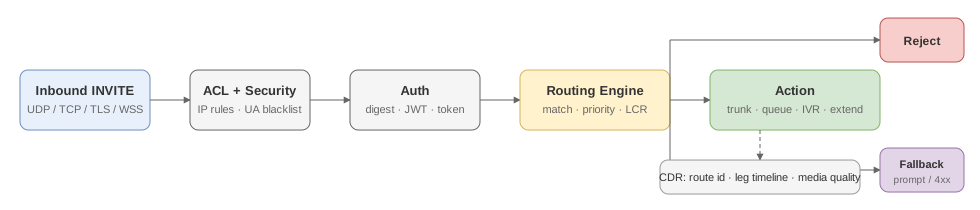
RustPBX separates transport (Trunks) from policy (Routing) and overlays billing templates for financial abstraction. This chapter walks through planning, configuration, and verification of carrier connectivity.
1. SIP Trunk management
1.1 Modeling principles
- Trunk = carrier resource: represents a carrier, wholesale partner, or internal SBC including reachability, authentication, and codec capabilities.
- Multiple trunks: orchestrate several trunks to balance cost, geography, or redundancy, and invoke them via routing priorities or round-robin strategies.
1.2 Creating a trunk
- Console → SIP Trunk → New, supply the label and SIP URI (
sip:host:port). - Choose authentication:
- IP allowlist: configure carrier egress IPs and permitted codecs.
- Username/password: fill
username/passwordand optionally enable TLS/SRTP.
- Fill runtime properties: codec list,
max_calls(concurrent call limit),max_cps(calls per second rate limit), allowedinbound_hosts, direction (direction), and backup destination (backup_dest). - Trunk rate limiter: the
max_cpsfield enforces a per-trunk calls-per-second ceiling. When exceeded, new INVITE messages receive SIP 503 (Service Unavailable). Setmax_callsfor concurrency andmax_cpsfor burst protection independently. - Trunk health monitoring: the proxy sends periodic SIP OPTIONS pings to each trunk. A trunk that fails consecutive probes is automatically marked degraded, and routing decisions can skip it. Monitor health via Diagnostics → Trunks. Call records also capture per-trunk post-answer media quality (loss %, jitter, RTT) so carrier degradation shows up in the CDR, not just in probes.
- SDES-SRTP (RTP/SAVP): the proxy automatically detects SDES-SRTP offers from carriers and responds in kind. No explicit trunk flag is needed — an inbound
RTP/SAVPoffer witha=cryptois answered withRTP/SAVP, and the encryption is mirrored to the outbound SIP leg when media is anchored. - Optional recording & media proxy: per trunk, you can set
recording.enabledandmedia_modeto override the global policy. See the GitOps example below for the TOML fields. - Per-trunk network binding (0.5+): overlay-network deployments (Tailscale/WireGuard, multi-WAN) can override the advertised RTP IP and the local bind IP per trunk via
external_ip/bind_ip, or reference a named[[network_profile]]from the main config. Per-trunk values win over the profile/global settings. - Header passthrough (0.5+): control which custom headers of the original INVITE are forwarded onto this trunk’s outbound INVITE with
header_passthrough—mode = "all" | "whitelist" | "blacklist" | "x_only". Standard SIP headers are never forwarded. Unset means custom headers are not forwarded to external trunks (internal destinations always forward unless the route overrides). Thex_onlymode is handy for CCF-style dial-out trunks that expectX-metadata. - ICE-lite (0.5+): set
ice_lite = truefor trunks with strict full-ICE peers (e.g. Microsoft Teams Direct Routing) — the proxy answers ICE-lite on plain-RTP legs. - Save to obtain a
trunk_idthat can be referenced from routing or billing templates.
1.3 GitOps configuration
Declare trunks under config/trunks/*.toml if you manage configs in Git:
name = "carrier-a"
uri = "sip:1.2.3.4:5060"
auth = { type = "ip", cidr = ["1.2.3.4/32"] }
codecs = ["g711a", "g729", "opus"]
concurrency_limit = 200
max_cps = 50

# Optional: override global recording policy per trunk
[recording]
enabled = true
auto_start = true
type = "local"

# Optional: override media proxy mode per trunk
# Values: "auto" (default), "none", "bypass", "all", "nat"
# media_mode = "auto"

# Optional: per-trunk network overrides (overlay networks / multi-WAN)
# external_ip = "100.64.10.1"
# bind_ip = "100.64.10.2"

# Optional: forward custom headers to this trunk's outbound INVITEs
# header_passthrough = { mode = "x_only" }          # only X- prefixed headers
# header_passthrough = { mode = "whitelist", whitelist = ["X-Customer-Id"] }

# Optional: ICE-lite for strict full-ICE peers (Teams Direct Routing)
# ice_lite = true
Run a Reload after committing changes (see the Diagnostics chapter).
2. Routing strategies

2.1 Rule structure
| Field | Description |
|---|---|
direction | inbound or outbound; differentiates call direction |
matchers | caller/callee patterns, time windows, geo tags, business labels |
actions | send to extensions, queues, IVRs, outbound trunks, or prompts |
fallback | backup behavior when the primary action fails |
2.2 Configuration workflow
- Catalog entry points: map DID blocks, SIP URIs, and outbound destinations, aligning them with trunk
directionandinbound_hostssettings. - Author rules: edit via the console or
config/routes/*.toml, referencingmatch.*helpers likefrom.*,to.*,request_uri.*, or any SIP header (regex supported). - Bind actions: use
action.destfor outbound trunks,action.queue/action.ivrfor internal flows, oraction.rejectto return SIP 4xx/5xx. - Layered policy: rely on
priorityplussource_trunks(orsource_trunk_ids) to scope rules per ingress. List multiple trunks insidedestto express active/backup order.
Example:
[[routes]]
name = "vip-outbound"
direction = "outbound"
matchers = { callee_prefix = ["0086", "+86"], extension_group = "vip" }
actions = [
  { type = "send_trunk", trunk_id = "carrier-a", timeout = 30 },
  { type = "send_trunk", trunk_id = "carrier-b", timeout = 30 }
]
fallback = { type = "play_prompt", prompt = "vip_no_route.wav" }
2.3 Releasing changes
- Always trigger Reload after saving drafts so the runtime picks up the latest routing file set.
- Use Diagnostics → Routing → Evaluate for both
runtimeanddatabasedatasets to ensure new rules resolve as expected before you publish. - Run real calls through
examples/voice_demo.rsor the built-in Web Dialer and compare resulting CDR entries with the intended billing template.
2.4 HTTP dynamic routing
For scenarios where routing decisions depend on an external system (CRM, real-time pricing, fraud scoring), configure an HTTP router:
[proxy.http_router]
url = "https://api.example.com/route"
headers = { Authorization = "Bearer token123" }
fallback_to_static = true
timeout_ms = 300
On each INVITE, RustPBX sends the call details as JSON to the configured URL. The external service returns a route decision (trunk, reject, or defer). When fallback_to_static = true, static config/routes/*.toml rules are evaluated if the HTTP endpoint is unreachable or returns no decision.
The HTTP payload includes caller, callee, source IP, and SIP headers — the external service has full context for routing logic. An external decision can also override the caller identity for the outbound leg.
Addons contribute their own rules to the same evaluation: the routing stack page in the console shows wholesale and CC contributions alongside core rules in one runtime-ordered view, and rules can be reordered via the PATCH API without a restart.
2.5 Emergency routing
Emergency calls bypass normal routing and are sent directly to a designated trunk:
[proxy.emergency]
enabled = true
numbers = ["110", "119", "120", "911"]
emergency_trunk = "emergency-carrier"
When an extension dials any listed number, the proxy immediately routes to emergency_trunk without evaluating static or HTTP routing rules. The default number set covers CN/US/UK emergency services.
2.6 DID number pool
For deployments with blocks of inbound numbers (DIDs), RustPBX can assign numbers from a pool using a least-used strategy. Configure number pools per trunk or globally to distribute inbound capacity evenly. When a call arrives on an unassigned DID, the proxy can select the least-busy extension from the pool’s target group.
2.7 Locator webhook
The locator service (which resolves SIP URIs to registered contact addresses) can notify external systems of registration changes via webhook:
[proxy.locator_webhook]
url = "https://hooks.example.com/locator"
events = ["register", "unregister"]
headers = { X-API-Key = "secret" }
timeout_ms = 5000
This is useful for syncing registration state with external presence servers, CRM systems, or custom dashboards.
3. Billing templates
Billing logic lives in models/bill_template.rs and is fully manageable via the console UI.
3.1 Design checklist

- Rate matrix: per-second or per-step billing, staged rates, minimum charges, and peak/off-peak deltas.
- Currency & tax: customizable currency, tax rate, and rounding to integrate with finance systems.
- Attach points: reference templates from routing, queue, or extension modules for policy+billing cohesion.
3.2 Example
[bill_template.vip]
currency = "CNY"
billing_step = 6
free_seconds = 60
rates = [
  { prefix = "0086", price = 0.05 },
  { prefix = "001", price = 0.15 }
]
3.3 Validation & reconciliation
- Export CDRs via Call Records and compare against template rates.
- Diagnostics → Billing highlights missing templates or failed matches.
- Extend revenue sharing via the
addons/wholesaleplugin when bespoke splits are required.
4. Best practices
- Active-active carriers: register per-carrier trunks and define priority plus failover steps to keep completion rates high.
- Differentiated billing: bind distinct templates to rules based on business tags to offer VIP vs. regular pricing tiers.
- Canary changes: stage routes with
enabled = false, reload, then toggle from the console for controlled rollouts. - Compliance trail: manage trunk/routing/billing edits through PR review so Git history captures every change.